· engineering · 7 min read
By AnvithAgentic Automation With Playwright MCP
Writing and refactoring tests manually is a significant bottleneck in QA workflows. Let's combine Playwright MCP with agentic code editors like AntiGravity or Copilot with a persistent AGENTS.md context file.
The Manual Problem
In testing world, writing and refactoring UI tests by hand slows you down. You have to open the inspector, locate selectors, run the debugger step by step, then repeat this entire loop for all the other tests when the UI changes. Instead of spending your time on that, you can move the heavy lifting to agents.
By combining Playwright MCP with agentic editors and a persistent project memory using AGENTS.md, you shift from manual test repair to a workflow where tests are fixed and created for you.
In this post, let’s walkthrough the problem, the setup, and the trade-offs so you can decide if this approach fits the new age QA setup and teams.
The Technical Setup
To use this workflow, you need three pieces:
- The Brain: An agentic code editor (Antigravity, or VSCode), with a sophisticated agentic-capable model like Claude 4.5 Opus or Gemini 3 Flash.
- The Connection: The
@playwright/mcpserver. This gives the LLM “Aria Snapshots”: maps of your UI based on semantic roles and labels rather than brittle CSS classes. Selectors based on accessibility attributes are more stable because they’re tied to meaning, not styling changes. - The Memory: Your
AGENTS.mdandlog.mdfiles.
Using AGENTS.md and log.md
To scale this, you need two specific files to store info that usually stays in a senior developer’s head.
1. AGENTS.md: The Brains of the Agent
This file follows the agents.md format. It lists the facts about your repo.
# AGENTS.md - Playwright Rules

## MCP Setup
- Use Playwright MCP via `@playwright/mcp` server
- Always use ARIA roles from snapshots: `getByRole('button', { name: 'Login' })`
- Never use CSS selectors like `.btn-primary` unless ARIA role unavailable

## Project Rules
- Login flow uses `auth.setup.ts` (see fixtures)
- Modal dismissal: press Escape, then wait 500ms
- API calls always use `waitForResponse('/api/**')` before assertions

## Seed Test
Refer to `checkout.spec.ts` for form filling patterns
Note: The
AGENTS.mdconvention is very new and isn’t standardized across editors yet. For example, Antigravity looks forGEMINI.mdby default, while Copilot looks forcopilot-instructions.md. Because of this, you may need to manually attachAGENTS.mdas context in your chat session for now, though this will likely be streamlined in the future.
2. log.md: The History Tracking File
Chat sessions lose track of details as they get longer. I use a log.md to track every change so I don’t have to explain the project again in a new window.
# log.md - Work History
- 2025-12-28: Fixed `checkout.spec.ts`. Changed `.btn-pay` to `getByRole('button', { name: 'Pay' })`.
- 2025-12-28: Created `auth.setup.ts` to bypass MFA on the staging server.
Sub-Agent Architecture
Don’t let one agent handle your entire task. A single agent with a huge prompt gets confused and makes mistakes. Instead, break work into sub-agents—temporary workers that each handle one task then close. (This pattern is inspired by approaches shared by other developers in the community.)
The Workflow:
- Orchestrator: The main agent that reads
log.mdand manages the process. - UI Explorer Sub-agent: Opens with a clean slate, looks at the site via MCP, writes a
plan.md, and closes. - Test Writer Sub-agent: Reads that plan, writes the test code, runs it to verify it works, and closes.
This keeps each step clean. The main agent doesn’t get bogged down by the technical noise of the browser exploration.
Agentic Workflow In Action
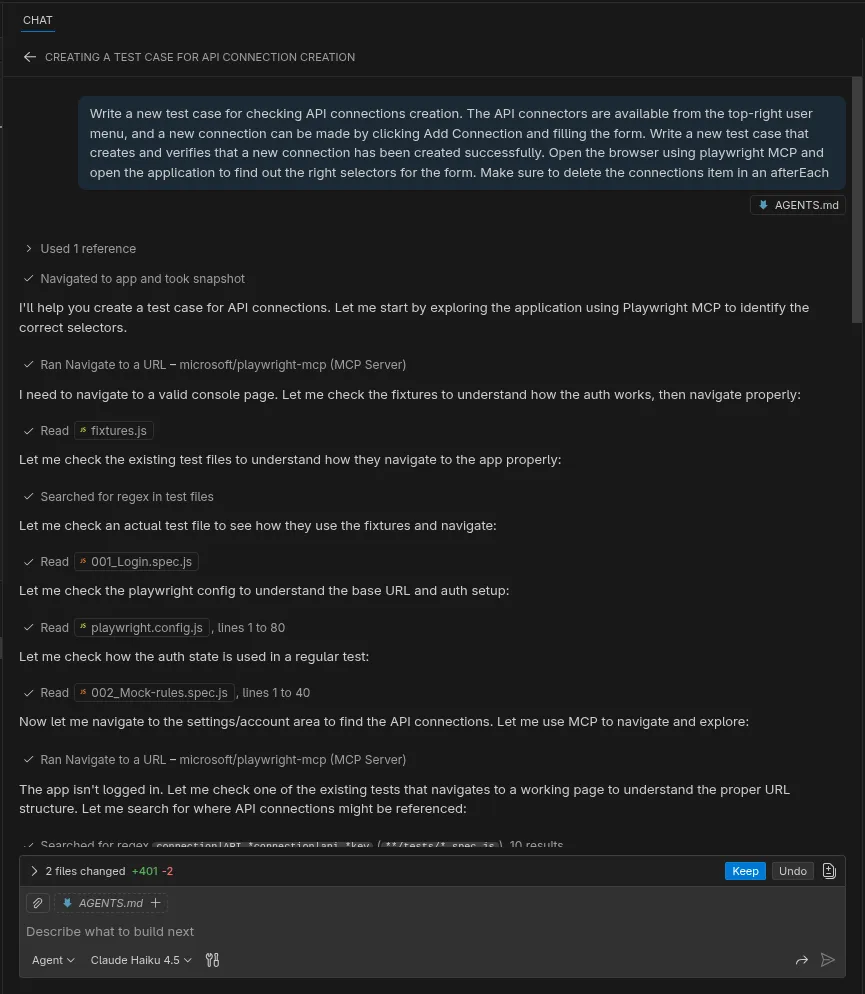
The screenshot above illustrates an agentic workflow in practice. Instead of guessing selectors, the agent uses the Playwright MCP to navigate the application and capture “Aria Snapshots”. It systematically reads project files like fixtures.js and playwright.config.js to understand the environment before it starts writing or fixing tests. This deep exploration phase ensures that the generated code aligns with your project’s existing patterns and architecture.
Case Study: Manual vs. Agentic Testing
The Manual Testing Day (~3 hours spent)
Your team deployed a UI redesign. The test suite is now red: 12 failing tests.
You start debugging. Inspect selectors, find that .btn-pay changed to .primary-cta. Update the test. Still fails—button takes 2 seconds to load. Add waitForSelector. Move to the next test. Each test requires inspection, guessing, and tweaking waits. A complex modal test takes extra time because you need to decide: click the button or press Escape? Check requirements. Try both approaches. Add delays.
By the time you’ve finished all the 12 tests, it’s been 2-3 hours. You’re behind on actual work.
The Agentic Testing Day (~15 minutes spent)
Same 12 failing tests.
You open VSCode with your AGENTS.md and prompt the agent: “Fix all failing tests using the rules in AGENTS.md. Use Playwright MCP.”
The agent explores the UI via MCP snapshots in 1-2 minutes, captures ARIA roles, reads your config. Then it fixes: replaces .btn-pay with getByRole('button', { name: 'Pay' }). Knows from AGENTS.md that modal dismissal uses Escape + 500ms. Runs all tests. 11 pass. One edge case fails (dynamic content). You add a note to AGENTS.md, agent fixes it.
Total time taken: 10-15 minutes. And, you’re back to real work.
The Compounding Benefit
By Friday, when the third UI redesign ships:
- Manual team: Lost 6-10+ hours across the week debugging the same patterns repeatedly.
- Agentic team: 30-60 minutes total. The agent learned your rules and applies them instantly.
The agent gets faster every time because it builds on what it learned from AGENTS.md.
Agentic Workflow: The Trade-offs
The Upsides:
| Feature | Agentic Workflow | Manual Scripting |
|---|---|---|
| Speed | 3-5x faster when writing new tests | Slow manual coding |
| Maintenance | Automatically heals broken tests | Manual debugging |
| Memory | Persistent in AGENTS.md and logs.md | ”Tribal knowledge” locked in testers’ heads |
| Success Rate | ~80% using Aria roles | 40-60% using brittle CSS/JS/XPath selectors |
The Downsides:
- API costs add up. Using Claude Opus, a 10-test suite might cost $2-5/month. For a team running 100+ tests weekly, budget $50-100/month. Compare this to 4 hours of manual debugging at $75/hour ($300/month).
- AGENTS.md requires recent information. If you change your UI patterns or project structure, your knowledge file becomes stale. Agents will follow outdated rules, leading to broken tests.
- LLMs aren’t perfect. They’re black boxes. Agentic workflows don’t guarantee precision. You still own the testing strategy, validation, and fixes. Expect to intervene atleast 10-15% of the time.
- Code duplication risk. Agents may implement utilities or patterns that already exist elsewhere. Without oversight, you’ll get code bloat and architectural drift. Include a “prohibited patterns” section in AGENTS.md to prevent this.
Getting Started
To implement this workflow:
- Install the MCP server:
npm install @playwright/mcp - Pick your editor: VSCode with Copilot or Antigravity both work well.
- Create AGENTS.md: Document your test patterns, selectors, and project rules (see the example above).
- Create log.md: Start with one entry. Update it after each agent session. (You may want to include this knowledge in
AGENTS.md) - Run your first task: Start small. Ask the agent to fix one broken test, not write ten new ones.
Three practical tips
Use seed tests: Provide a
seed.spec.tsor a seed page object that shows your preferred patterns. Reference it inAGENTS.mdso the agent copies your style instead of inventing one.Be specific with prompts: Do not ask to “test the whole app”. Ask for something concrete like “create a guest checkout flow with address validation and payment retry”. Break complex work into small instructions if needed.
Close the loop: When an agent fixes a test or solves a problem correctly, tell it to update
AGENTS.md. That way the next fix is faster and cleaner.
When Things Break: Recovery Patterns
Encountering Flaky tests: Add wait and retry logic to
AGENTS.mdwhen your encounter flaky tests. Example: “Always usepage.waitForLoadState('networkidle')before asserting dynamic content”Duplication of existing utilities/ helpers: Add a “Prohibited Patterns” section to AGENTS.md listing utilities that already exist, and tell the agent to check there first.
Rules being ignored: Simplify your prompts. Instead of “use best practices,” say “always copy the pattern from
auth.spec.tsline 15-30.”Tests pass locally but fail in CI: The agent may not know about CI-specific waits or timeouts. Add these to
AGENTS.md. Example: “CI runs 2x slower; use 10s timeouts instead of 5s.”
Conclusion: You’ve Been Promoted!
Today, you are no longer just writing scripts, you are actually directing a team of fast, focused agents. When the UI changes, stop blocking yourself. With such agentic flows, your shipping speed improves. Playwright MCP gives agents a stable view of your UI. The context in AGENTS.md gives them memory. Together, they turn test automation from a manual chore into a managed system that works with you, not against you.